
How to Protect Your Privacy from Google IP Tracking

Turbo VPN
2026/07/23
Cybersecurity
Last updated:
2026/07/23
7 minutes


Google’s recent decision to allow advertisers to use IP addresses for certain advertising measurement activities has renewed discussions around Google IP tracking and digital fingerprinting. As third-party cookies continue to decline, IP addresses are becoming a more important signal for measuring ad performance and detecting fraud. For users who want greater online privacy, reducing unnecessary IP exposure is an important first step. A trusted VPN for privacy, such as Turbo VPN, can help hide your IP address by encrypting your connection and routing your traffic through secure VPN servers. In this article, we’ll explain what Google’s policy change means, how digital fingerprinting works, and how Turbo VPN can help strengthen your online privacy.
Table of Contents
What Changed in Google’s IP Tracking Policy?
As the online advertising ecosystem shifts away from third-party cookies, advertisers are increasingly relying on alternative signals to measure campaign performance. Google’s updated advertising policy allows IP addresses to be used in certain ad measurement scenarios, including attribution, fraud prevention, and performance analysis.
While Google states that these practices are designed to support advertising effectiveness while maintaining user privacy, the policy update has raised concerns among privacy advocates. They argue that when IP addresses are combined with browser and device data, they may contribute to more sophisticated user identification techniques.
It’s important to note that an IP address alone typically cannot uniquely identify an individual. However, as part of a broader set of technical signals, it may play a larger role in today’s advertising ecosystem than before.
What Is Digital Fingerprinting?
Digital fingerprinting, also known as browser fingerprinting, is a technique used to identify devices based on characteristics automatically shared by browsers.
Instead of relying on cookies, websites may analyze information such as:
🖥️ IP address
🌐 Browser type and version
💻 Operating system
📱 Screen resolution
🌍 Language settings
🕒 Time zone
🔤 Installed fonts
🎨 Canvas and WebGL rendering data
When combined, these data points can create a browser fingerprint that distinguishes one device from another.
Because browser fingerprinting does not depend on cookies, users cannot simply clear their browser history to prevent it. This is one reason why digital fingerprinting continues to be a major topic in cybersecurity and online privacy discussions.
Why Use a VPN for Privacy?
If you’re wondering how to hide your IP address, using a VPN for privacy is one of the easiest and most effective options.
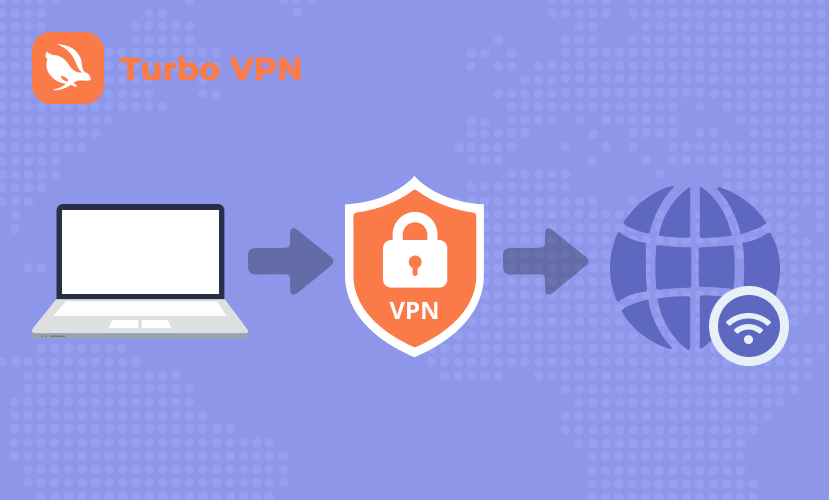
A VPN encrypts your internet traffic and routes it through a secure VPN server before it reaches the websites you visit. As a result, websites generally see the VPN server’s IP address instead of your original public IP address.
Using a VPN can help:
· Hide your IP address from websites.
· Encrypt your internet connection.
· Reduce IP exposure on public Wi-Fi.
· Make it more difficult for websites to associate browsing activity with your real network.
While a VPN can significantly reduce IP exposure, it does not completely prevent digital fingerprinting. Browser characteristics such as screen resolution, fonts, browser configuration, and device settings may still be visible. For stronger privacy protection, a VPN should be used alongside good browser privacy practices.
How to Use Turbo VPN to Hide Your IP Address
If you’re looking for a simple way to hide your IP address and add an extra layer of privacy while browsing, Turbo VPN makes the process quick and straightforward. Getting started only takes a few minutes.
Step 1: Download and Install Turbo VPN
Turbo VPN is available on:
· Android
· iOS
· Windows
· macOS
Download and install Turbo VPN on the device you use for everyday browsing. Once installed, open the app and sign in to your account, or create one if you’re a new user.
Step 2: Connect to a Secure VPN Server
Launch Turbo VPN and choose a server location from the available server list. Once connected, your internet traffic is encrypted and routed through the VPN server, helping hide your public IP address from the websites you visit.
Premium users can access additional server locations and optimized servers for greater flexibility and performance.
💡 Tips:
If you’re new to Turbo VPN, you may be eligible for a Premium Plan free trial. Premium users can enjoy access to more global server locations, faster connection speeds, and additional privacy features. If you decide Premium isn’t for you after upgrading, you’re covered by a 30-day money-back guarantee.
Step 3: Verify That Your IP Address Has Changed
After connecting to Turbo VPN, visit Turbo VPN’s What Is My IP page to check whether your IP address has changed.
If the displayed IP address matches your selected VPN server location instead of your original network, your VPN connection is working correctly. You can also view additional connection details, such as your approximate location and IP information, to confirm that your traffic is being routed through the VPN server before you continue browsing.
Step 4: Browse Securely
With Turbo VPN connected, you can continue browsing, shopping, streaming, or working online as you normally would. Your connection remains encrypted, and websites generally see the VPN server’s IP address instead of your original public IP.
For the best experience, keep Turbo VPN connected whenever you’re using public Wi-Fi or handling sensitive online activities, such as online banking, remote work, or accessing personal accounts.
Enable the Kill Switch If You Need Extra Privacy
Hiding your IP address with a VPN is an important step toward improving online privacy, but what happens if your VPN connection unexpectedly drops? Without additional protection, your device may automatically reconnect through your regular internet connection, potentially exposing your real IP address until the VPN reconnects.
That’s where a Kill Switch can help.
A VPN Kill Switch is a security feature that automatically blocks your internet connection if the VPN disconnects unexpectedly. Instead of allowing your device to continue browsing with your original IP address, it temporarily stops internet traffic until the secure VPN connection is restored.
Using Turbo VPN’s Kill Switch can help you:
· Reduce the risk of accidentally exposing your real IP address.
· Keep your internet traffic protected if the VPN connection drops.
· Maintain a more consistent level of privacy while browsing.
· Add an extra layer of protection when using public Wi-Fi or other unsecured networks.
For users concerned about Google IP tracking or limiting unnecessary IP exposure, enabling the Kill Switch provides additional peace of mind by helping ensure your device doesn’t briefly reconnect without VPN protection.
Additional Ways to Reduce Digital Fingerprinting
Because browser fingerprinting relies on more than just your IP address, protecting your privacy requires a combination of tools and good browsing habits.
In addition to using Turbo VPN, consider these cybersecurity best practices:
🔄 Keep your browser up to date.
🧩 Limit unnecessary browser extensions.
🗑️ Regularly clear cookies and browsing data.
📍 Restrict location, camera, and microphone permissions.
🛡️ Enable privacy-focused browser settings.
🚫 Disable third-party cookies whenever possible.
Using multiple privacy measures together can help reduce the amount of information websites collect and strengthen your overall online privacy.
Conclusion
Google’s updated advertising policy has renewed conversations about Google IP tracking and the growing role of digital fingerprinting in today’s advertising ecosystem. While IP addresses alone do not uniquely identify individuals, they can become more meaningful when combined with browser and device information. Fortunately, there are practical steps you can take to better protect your privacy. Learning how to hide your IP address, using a trusted VPN for privacy, and adopting stronger browser privacy settings can all help reduce unnecessary exposure online. If you’re looking for a simple and reliable way to strengthen your online privacy, Turbo VPN makes it easy to hide your IP address, encrypt your internet connection, and browse the web with greater confidence.
Take Control of Your Online Privacy
Reduce unnecessary IP exposure and strengthen your online privacy with a secure VPN connection.
Get Turbo VPN
FAQ
1. Does Google use IP addresses to track users?
2. Can a VPN stop digital fingerprinting?
3. Does Turbo VPN hide my IP address?
4. Is hiding your IP address legal?
5. What are the best ways to protect your online privacy?


How Turbo VPN Makes Browsing on Your PC Secure and Private

F1 US GP 2026 Free Streaming: Platforms and Viewing Guide

Turkey Social Media Ban: What Users Need to Know in 2026
